DirectAdmin explained for beginners, including hosting control panels, domains, email, databases, files, SSL, backups and website management.
What Is DirectAdmin?
DirectAdmin is a web hosting control panel used to manage websites, domains, email accounts, databases, SSL certificates and DNS records from a single dashboard. It is one of the most popular alternatives to cPanel and is known for its speed, simplicity and low resource usage.
With DirectAdmin you can manage website files, create professional email accounts, install SSL certificates, manage MySQL databases, edit DNS records and install WordPress using one-click tools. Most website owners only ever use the User Level interface, making it suitable for beginners and businesses alike.
Key Features of DirectAdmin
- Website and domain management
- Email account creation and management
- MySQL database administration
- SSL certificate installation
- DNS management tools
- File Manager access
- Backup and restore functionality
- One-click WordPress installations
- Multi-domain hosting support
- Reseller account management
DirectAdmin is one of the most widely used hosting control panels available today. It gives website owners a central dashboard for managing domains, email accounts, databases, DNS records, SSL certificates and website files.
Unlike command-line administration, DirectAdmin allows most day-to-day hosting tasks to be completed through a web browser, making it suitable for beginners while still providing powerful tools for developers and agencies.
Why Website Hosts UK Uses DirectAdmin
We use DirectAdmin because it is lightweight, fast and reliable. Customers can manage websites, email, databases and security settings without unnecessary complexity, while still benefiting from advanced features when required.
If you're looking for UK hosting that includes DirectAdmin, take a look at our DirectAdmin Hosting plans which include DirectAdmin, NVMe storage, free SSL certificates and UK-based support.
Quick Summary
DirectAdmin helps you manage websites, domains, email accounts, databases, DNS records and SSL certificates from one dashboard. Most users only need User Level, while agencies and hosting providers can also use Reseller and Admin Levels.
- Control Panel
- Domains
- Email Accounts
- Databases
- File Manager
- SSL Certificates
- DNS Management
- Backups
- User Levels
Getting Started with DirectAdmin
1. Login to DirectAdmin
Access the control panel using the details supplied with your hosting account.
2. Add Your Domain
Connect your domain and verify DNS settings.
3. Create Email Accounts
Set up professional email addresses for your business.
4. Enable SSL
Secure your website with a free Let's Encrypt SSL certificate.
5. Install WordPress
Use one-click installers to launch WordPress quickly.
DirectAdmin Screenshots
The screenshots below show some of the most commonly used areas within DirectAdmin. Most website owners will use these sections regularly to manage websites, email accounts, SSL certificates and website files.
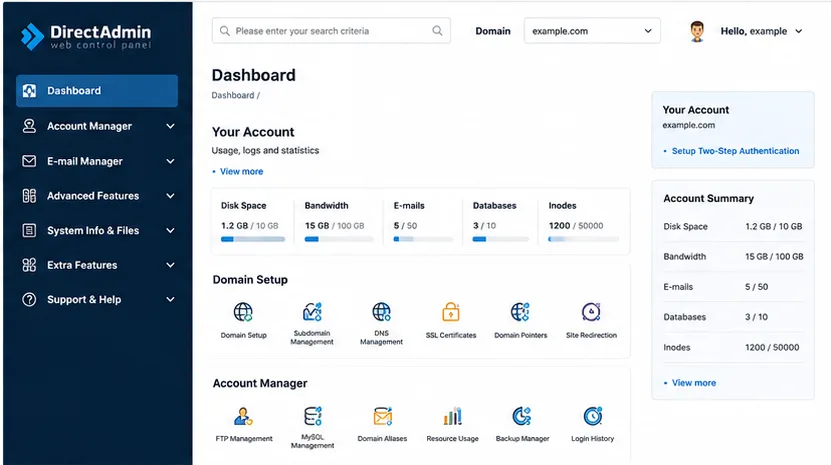
DirectAdmin Dashboard
The main dashboard provides an overview of your hosting account including domains, databases, email accounts, SSL certificates and resource usage.
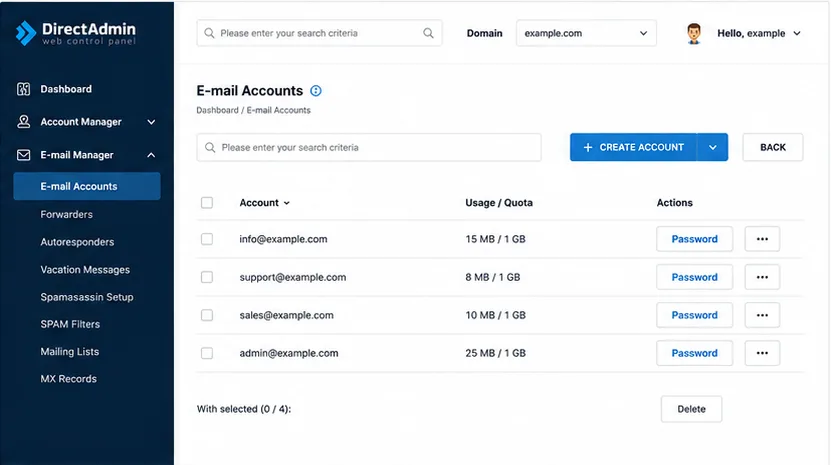
Email Accounts
Create professional email addresses, manage mailbox storage, configure forwarding and access webmail directly from DirectAdmin.
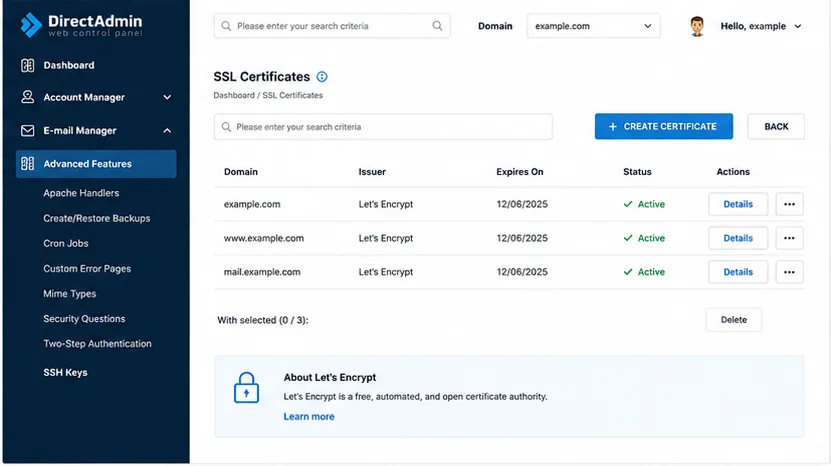
SSL Certificates
Secure your website with Let's Encrypt or commercial SSL certificates and manage HTTPS settings from a single location.
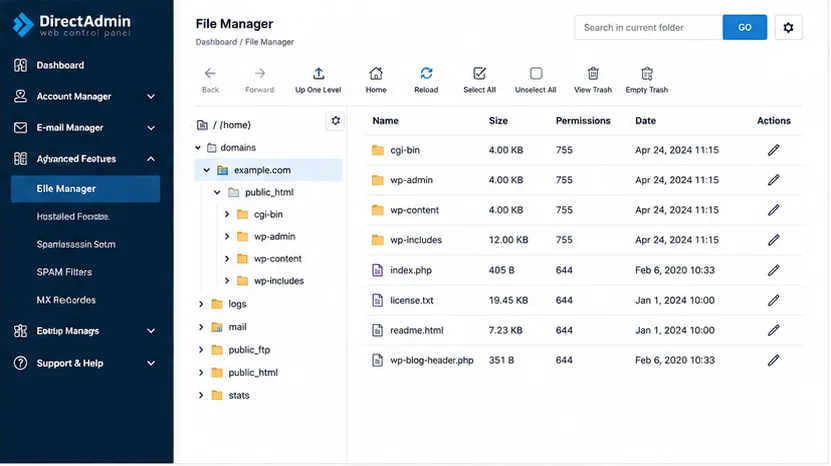
File Manager
Upload, edit and manage website files directly through your browser without requiring FTP software or SSH access.
DirectAdmin User Level
User Level is where most website owners spend their time. It provides access to website files, domains, email accounts, databases, DNS records and SSL certificates from a single dashboard.
For most businesses, User Level contains everything needed to run a website without requiring server administration knowledge.
DirectAdmin Reseller Level
Reseller Level is designed for agencies, developers and hosting resellers who manage multiple customer accounts. It allows hosting packages, user accounts and resource limits to be managed from one interface.
If you plan to sell hosting services or manage multiple client websites, you can compare our DirectAdmin-powered Reseller Hosting plans designed for agencies, developers and hosting resellers.
DirectAdmin Admin Level
Admin Level provides full server control. Administrators can manage services, security, users, resellers and server-wide settings. This level is commonly used on VPS and dedicated servers.
Managing Websites in DirectAdmin
DirectAdmin includes a File Manager, FTP account management, domain management, subdomains, redirects and backup tools. Most common website tasks can be completed without using SSH.
Email Management in DirectAdmin
DirectAdmin includes mailbox creation, forwarders, autoresponders, spam filtering and webmail access. Businesses can create professional email addresses linked to their domain names. See our guide to managing email with DirectAdmin.
Database Management
MySQL and MariaDB databases can be created and managed directly from DirectAdmin. phpMyAdmin integration allows database administration through a browser.
SSL Certificates in DirectAdmin
DirectAdmin supports free Let's Encrypt SSL certificates and commercial SSL certificates. HTTPS can usually be enabled in a few clicks and certificates can be renewed automatically. Learn more about DirectAdmin hosting and VPS options.
DNS Management in DirectAdmin
DNS records including A, AAAA, MX, TXT and CNAME records can be managed from the DNS Management section. This allows website and email services to be configured without third-party tools. If you are setting up a website, see installing WordPress in DirectAdmin.
DirectAdmin vs cPanel
For a deeper comparison, read our DirectAdmin vs cPanel guide.
| Feature | DirectAdmin | cPanel |
|---|---|---|
| Ease of Use | Simple and lightweight | Feature rich |
| Resource Usage | Lower | Higher |
| Email Management | Included | Included |
| SSL Management | Included | Included |
| WordPress Support | Yes | Yes |
| Best For | Performance and value | Large ecosystem |
Advantages of DirectAdmin
- Fast and lightweight interface.
- Easy for beginners to learn.
- Lower licensing costs.
- Strong email, DNS and SSL tools.
- Suitable for shared hosting, reseller hosting and VPS hosting.
Potential Drawbacks
- Smaller ecosystem than cPanel.
- Fewer tutorials available online.
- Some users need time to adapt if migrating from cPanel.
Frequently Asked Questions
What is DirectAdmin?
DirectAdmin is a web hosting control panel used to manage websites, domains, email accounts, databases and SSL certificates.
What is DirectAdmin used for?
It is used for website, email, DNS, database and hosting account management.
Is DirectAdmin free?
No. It is commercial software licensed by hosting providers and server owners.
Is DirectAdmin easier than cPanel?
Many users find DirectAdmin simpler because of its cleaner interface.
Can I install WordPress in DirectAdmin?
Yes, most DirectAdmin hosting includes one-click WordPress installers.
Does DirectAdmin support email hosting?
Yes. Mailboxes, forwarding and autoresponders are supported.
Can I manage multiple domains?
Yes, depending on your hosting package.
Does DirectAdmin support SSL?
Yes. Let's Encrypt and commercial certificates are supported.
Who should use DirectAdmin?
Businesses, bloggers, developers and agencies.
What are User, Reseller and Admin levels?
User manages websites, Reseller manages accounts and Admin manages the server.
Why DirectAdmin Remains Popular
DirectAdmin remains popular because it combines ease of use, performance and reliability. It provides all of the essential tools required to manage modern websites without overwhelming users.
Whether you run a personal blog, business website, WooCommerce store or reseller hosting business, DirectAdmin offers a practical balance between simplicity and functionality.
For users looking for a lightweight alternative to cPanel, DirectAdmin continues to be one of the strongest options available.